
Navigation
 This help is based on the layout of the MoinMoin modernized theme. If the modernized theme is not your current theme, the positions and labels of navigation controls may be slightly different. However, the functions of the individual controls will be the same.
Screen Layout
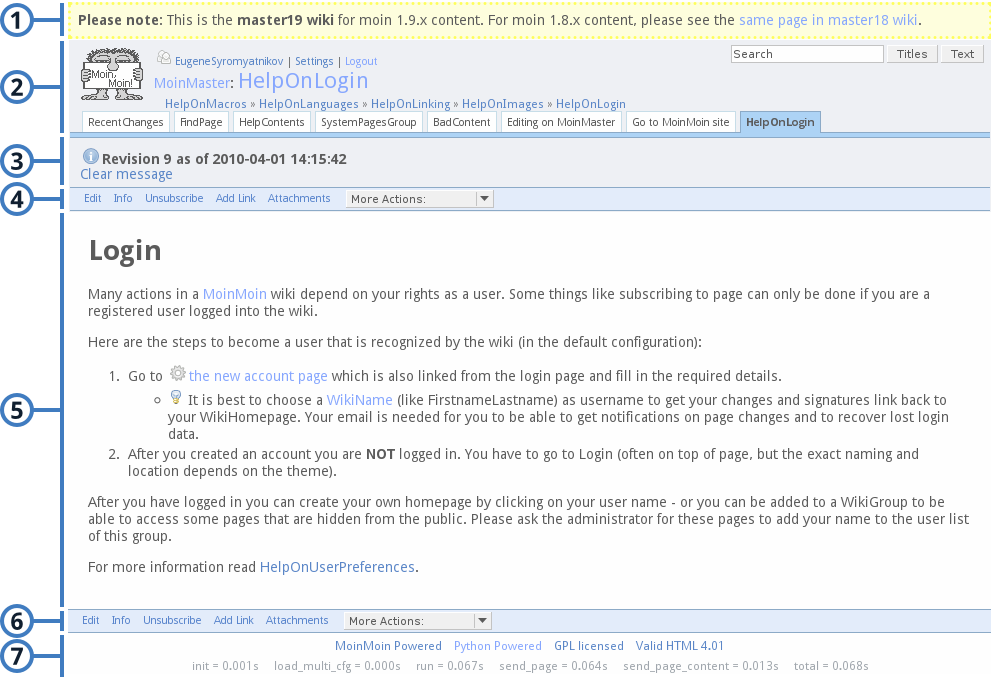 The screen layout contains the following parts (from top to bottom):
- Page header
- Navigation bar, a collection of tabs for quick links
- Dynamic message box
- Actions toolbar
- Canvas for page rendering
- Actions toolbar, same as part 4
- Page bottom
The first four parts are the most important and will be introduced below.
Page Header
This part contains the following elements:
- Site logo (optional): it is also a link to the front page (home).
- User login:
- not logged in: offers a link to log in
- logged in: shows your user name (links to your home page), provides a link to user preferences (Settings) and a logout link.
Search bar: allows you to search this site. The default button (you get it by hitting <ENTER>) does a title search. If you want to do a full text search, you need to click on the other button.
- Page path: shows the path of the page. Clicking on the page title link will show every page that refers this page. If it is a subpage, you can click on the parent page to go up.
Page trail: lists the last five pages visited, so you can jump back several pages easily. You have to enable Show page trail to see it.
Navigation Bar
This part is a collection of tabs for quick links. By default, there are three tabs:
RecentChanges, links to a page to show recent modifications of the wiki
FindPage, links to a page offering search and index functions
HelpContents, links to main help page
Besides the default tabs, you can also add your favourite pages to this bar by clicking Add Link on each page or editing Quick links list in your user preferences.
Dynamic Message Box
This box is displayed when there are messages. You can click Clear message to close it or it will be closed automatically when you move to another page.
Actions Toolbar
This part is the links for the most often used functions:
Edit, allows you to edit the page
Depends on your user preferences, it may be Edit (Text) and Edit (GUI) to let you choose which editor to use
If you have no right to edit this page, Immutable Page is displayed instead
Comments, toggles visibility of comments (appears only when the current page has comments, see HelpOnComments)
Info, shows meta information about the page, especially the full version history
Show "Revision History", shows revision history of the page
Show "General Page Infos", shows general information of the page
Show chart "Page hits and edits", shows page hits and edits count
Subscribe/Unsubscribe, allows to subscribe or unsubscribe to email notifications for the current page
Add Link/Remove Link, allows to add/remove your favourite pages to/from navigation bar
Attachments, allows to manipulate attachments of the page
More Actions:, contains the following common functions:
Raw Text, shows the source code of the current page
Print View, shows a printable version of the page without the header or footer
Delete Cache, force the page to be recompiled
Check Spelling, invokes spelling checker
Like Pages, prints a list of pages with titles similar to this page
Local Site Map, prints a list of pages that are referred from this page
Rename Page, allows to rename this page
Delete Page, allows to delete this page
- Any custom actions you have installed.
 This toolbar is duplicated at the page bottom for convenience.